Best Beginner AI Innovation Tools of 2026
Artificial intelligence is no longer the exclusive domain of scientists and Silicon Valley engineers. In 2025, anyone with a laptop and an internet connection can harness the power of AI — to write faster, design smarter, code more efficiently, and automate repetitive work. Whether you are a student, a small business owner, a freelancer, or simply a curious person, the right AI tool can transform the way you work and create.
The 7 Best Beginner AI Innovation Tools of 2026
After evaluating over 60 platforms across categories — writing, design, productivity, coding, and research — we narrowed our list to seven tools that consistently deliver value to newcomers, offer free entry points, and have strong user communities.
1. ChatGPT (OpenAI) — Best All-Round AI Assistant
Category: Writing · Research · Coding · Brainstorming | Pricing: Free / $20 per month
ChatGPT remains the gold standard for conversational AI in 2026. Powered by GPT-4o, it can write essays, debug code, translate over 50 languages, summarise documents, and hold detailed multi-turn conversations — all through a simple chat interface. The free tier is genuinely useful, and the Plus plan unlocks image generation, file analysis, and advanced data tools.
- No technical setup required — just sign up and chat
- Custom GPTs allow personalised assistants for any niche
- Supports voice mode, image uploads, and file analysis
- 180 million+ monthly active users
User Rating: 4.8 / 5
2. Canva AI — Best for Design and Visual Content
Category: Design · Marketing · Social Media | Pricing: Free / $15 per month
Canva’s Magic Studio suite integrates generative AI directly into its familiar drag-and-drop design environment. Magic Write generates marketing copy, Magic Design turns a prompt into a branded template, and Magic Media creates images and short videos from text. For non-designers, it is the fastest path from idea to polished visual.
- 500,000+ templates across every category
- Text-to-image, text-to-video, and AI background remover included
- Brand Kit keeps colours and fonts consistent automatically
- Free plan includes 50 AI image generations per month
User Rating: 4.7 / 5 | 170 million+ monthly active users
3. Grammarly — Best AI Writing and Communication Assistant
Category: Writing · Editing · Professional Communication | Pricing: Free / $12 per month
Grammarly has evolved from a spelling checker into a full AI communication partner. Its AI layer suggests tone shifts, rewrites entire paragraphs, detects plagiarism, and generates first drafts. It integrates with Gmail, Google Docs, Outlook, LinkedIn, and over 500,000 other apps via its browser extension.
- Real-time grammar, tone, and clarity feedback
- AI generative writing and full-paragraph rewrites
- Works wherever you type online
- Plagiarism detection across 16 billion web pages
User Rating: 4.6 / 5 | 30 million+ daily active users
4. Notion AI — Best for Productivity and Note-Taking
Category: Productivity · Notes · Project Management | Pricing: Free / $10 per month
Notion AI supercharges the already powerful Notion workspace. Ask it to summarise meeting notes, generate project outlines, draft action items, or translate content — all without leaving the page you are working on. The AI has contextual awareness of your entire workspace, making it more useful the more you use it.
- Summarise, translate, and expand text in one click
- AI-powered Q&A searches your entire knowledge base
- Generates structured databases, tables, and timelines automatically
- Built into the existing Notion free and paid plans
User Rating: 4.6 / 5 | 100 million+ Notion platform users
5. Google Gemini — Best Free AI for Google Users
Category: Research · Writing · Google Workspace | Pricing: Free / $19.99 per month
Google Gemini is the most powerful completely free AI assistant in 2025. Gemini 1.5 Pro — available on the free tier — features a 1 million token context window, meaning you can upload entire books or documents and ask questions about them. It integrates deeply with Gmail, Google Docs, Sheets, and Search.
- Free access to Gemini 1.5 Pro with a massive context window
- Reads and analyses images, PDFs, audio, and video
- Deep Google Workspace integration across all major apps
- Real-time Google Search grounding for accurate, current answers
User Rating: 4.4 / 5 | 250 million+ monthly visits
6. Runway ML — Best AI for Video and Creative Media
Category: Video Generation · Content Creation | Pricing: Free trial / $12 per month
Runway’s Gen-3 Alpha model is the frontrunner in AI video generation for 2025. Beginners can generate short cinematic videos from text prompts, remove backgrounds from footage in real time, replace objects in videos, and apply artistic styles — all through a browser-based editor requiring no video production experience.
- Text-to-video and image-to-video generation
- AI background removal with one click
- Motion Brush lets you control movement direction in generated videos
- 125 free credits on sign-up to get started immediately
User Rating: 4.5 / 5 | $236 million raised in Series C funding
7. GitHub Copilot — Best AI for Aspiring Coders
Category: Coding · Software Development | Pricing: Free for students / $10 per month
GitHub Copilot is the world’s most widely used AI coding assistant, with over 1.8 million paid subscribers as of Q4 2024. It autocompletes entire functions, suggests optimised code, explains existing codebases in plain English, and generates unit tests automatically. For beginners learning to code, it functions as a patient, always-available mentor.
- Inline code suggestions directly in VS Code or JetBrains IDEs
- Copilot Chat explains code line-by-line in plain English
- Supports 40+ programming languages
- Completely free for verified students and open-source maintainers
User Rating: 4.7 / 5 | 1.8 million+ paid users
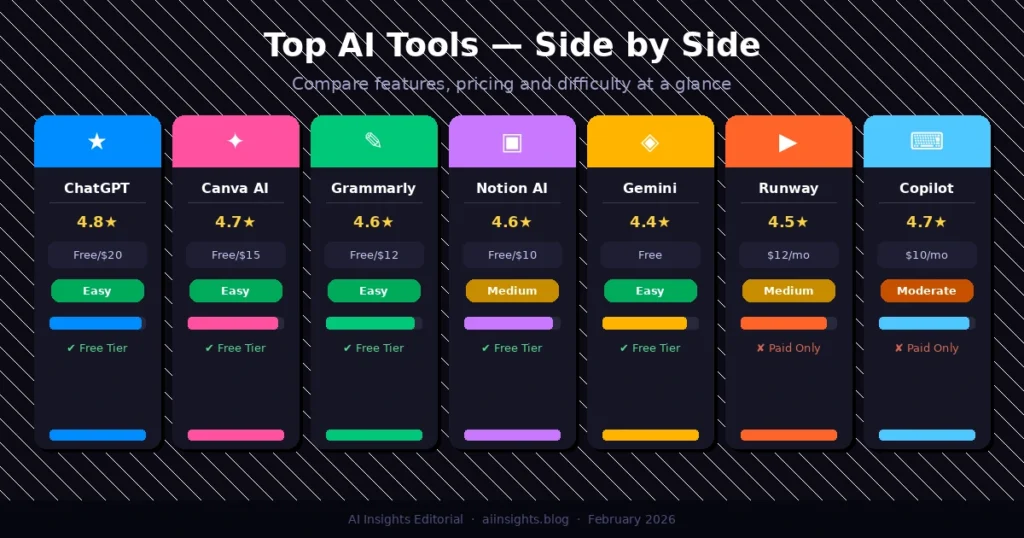
Quick Comparison: Top AI Tools at a Glance
| Tool | Best For | Free Tier | Paid From | Rating | Difficulty |
| ChatGPT | All-round tasks | Yes | $20/mo | 4.8 / 5 | Easy |
| Canva AI | Design & visuals | Yes | $15/mo | 4.7 / 5 | Easy |
| Grammarly | Writing & editing | Yes | $12/mo | 4.6 / 5 | Easy |
| Notion AI | Productivity & notes | Yes | $10/mo | 4.6 / 5 | Medium |
| Google Gemini | Research & Google apps | Yes (Pro) | $19.99/mo | 4.4 / 5 | Easy |
| Runway ML | Video creation | 125 credits | $12/mo | 4.5 / 5 | Medium |
| GitHub Copilot | Coding & development | Students free | $10/mo | 4.7 / 5 | Moderate |
Best Beginner AI Innovation Tools of 2026: How to Get Started with AI Tools: A Beginner’s Roadmap
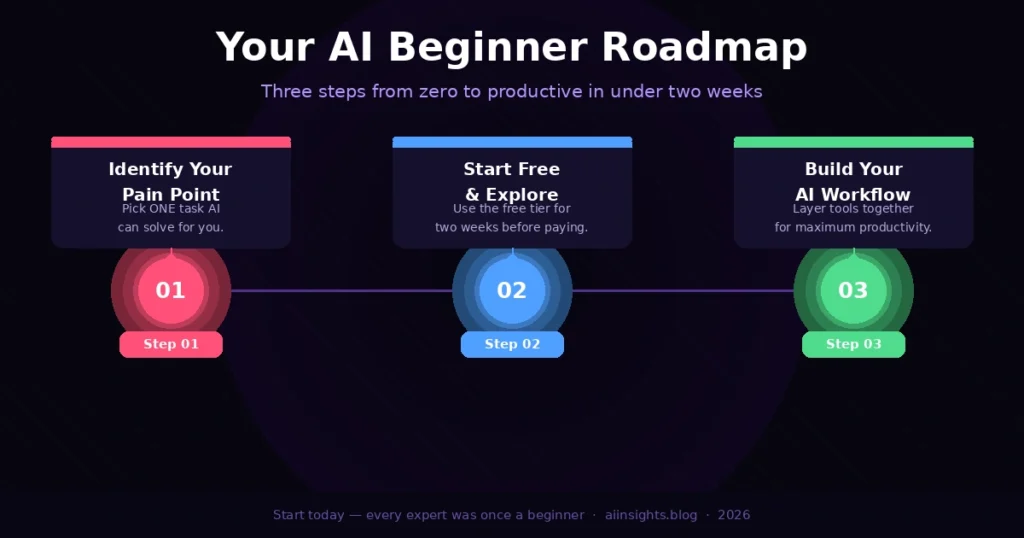
Starting your AI journey does not require an elaborate plan. Here is a practical three-step approach that works for most beginners.
Step 1 — Identify Your Biggest Pain Point
Do not try all tools at once. Ask yourself: what task eats the most of my time or causes the most friction? If it is writing, start with ChatGPT or Grammarly. for design, start with Canva AI. If it is staying organised, Notion AI is your best bet. Focusing on one clear use case ensures you see results quickly and builds the confidence to adopt more tools later.
Step 2 — Start with the Free Tier
Every tool on this list offers a meaningful free tier. Commit two weeks to exploring it before spending any money. YouTube tutorials, official documentation, and community forums — Reddit’s r/ChatGPT has over 3.2 million members — will accelerate your learning significantly.
Step 3 — Build a Personal AI Workflow
Once comfortable with one tool, layer in a second. A powerful beginner workflow might look like: ChatGPT to draft, Grammarly to refine, Canva AI to visualise, and Notion AI to organise and publish. These tools are designed to complement one another, and mastering this kind of pipeline is where the real productivity gains appear.
Tip: Use ChatGPT to write better prompts for other AI tools. Ask it: “Give me 10 effective prompts for Canva’s Magic Write for social media captions in the wellness niche.” You will immediately unlock deeper value from every tool in your stack.
Best Beginner AI Innovation Tools of 2026: AI Innovation Trends Beginners Should Watch in 2026
Multimodal AI is Becoming the Norm
Every major AI platform — ChatGPT, Gemini, Claude — now handles text, images, audio, and video in a single conversation. This convergence means beginners no longer need separate tools for different media types. Expect this to deepen significantly by late 2025, with AI glasses and real-time visual voice assistants entering everyday life.
AI Agents Will Work Autonomously on Your Behalf
Agentic AI — where the model takes multi-step actions without constant human direction — is moving from research labs to consumer products. OpenAI’s Operator and Google’s Project Mariner preview a near future where your AI assistant can book travel, manage your inbox, and draft client reports while you focus on higher-order thinking. Beginners who learn to prompt and supervise AI agents today will have a significant head start.
On-Device AI Reduces Cloud Dependence
Apple Intelligence, Qualcomm’s AI-enabled chips, and Meta’s locally running LLaMA models signal a shift toward privacy-preserving AI that operates on your device without sending data to external servers. For beginners concerned about data privacy, this trend brings real reassurance — and faster response times to boot.
Best Beginner AI Innovation Tools of 2026: People Also Ask(FAQ’s)
What is the easiest AI tool for a complete beginner?
ChatGPT and Canva AI are widely considered the easiest entry points. Both require no technical knowledge, offer generous free tiers, and have intuitive interfaces. Most beginners create useful outputs within their first 30 minutes.
Are AI tools free to use?
Most top AI tools offer meaningful free tiers. ChatGPT, Canva AI, Grammarly, Notion AI, and Google Gemini all have free plans that are genuinely useful for beginners. Paid plans typically unlock faster performance, higher usage limits, and advanced features. Starting free is always recommended before committing to a subscription.
Can AI tools replace jobs?
AI tools automate repetitive and rule-based tasks, but they work best as productivity multipliers rather than direct replacements. According to the World Economic Forum’s Future of Jobs Report 2025, AI will displace 85 million jobs by 2030 but simultaneously create 97 million new roles. Workers who adopt AI early consistently see higher productivity and earnings.
Which AI tool is best for students?
For students, a combination of ChatGPT for research and drafting, Grammarly for editing, and Notion AI for organising notes provides tremendous value. GitHub Copilot is free for verified students and ideal for those studying computer science. Always check your institution’s AI use policy before submitting AI-assisted work.
Is it safe to use AI tools with personal data?
Reputable AI tools like ChatGPT, Grammarly, and Notion comply with GDPR and major data protection regulations. Best practices include turning off chat history in ChatGPT settings and using anonymised examples when testing sensitive scenarios. For highly sensitive professional data, look for tools with enterprise-grade security guarantees.
How long does it take to learn AI tools?
Most beginners achieve productive competency with a single AI tool within one to two weeks of daily use. Basic proficiency typically comes within the first few days. The learning curve is significantly gentler than traditional software skills like coding or video editing.
References
- McKinsey & Company (2024). The State of AI in 2024: Generative AI’s Breakout Year. mckinsey.com
- Statista (2025). ChatGPT Monthly Active Users Worldwide, 2022–2025. statista.com
- World Economic Forum (2025). Future of Jobs Report 2025. weforum.org
- Grand View Research (2024). Artificial Intelligence Market Size & Trends, 2024–2030. grandviewresearch.com
- GitHub (2024). GitHub Copilot Impact Report 2024. github.com
- OpenAI (2025). ChatGPT Product Page and GPT-4o Model Card. openai.com
- Canva (2024). Magic Studio — AI Design Tools Overview. canva.com